Run every
from one window.
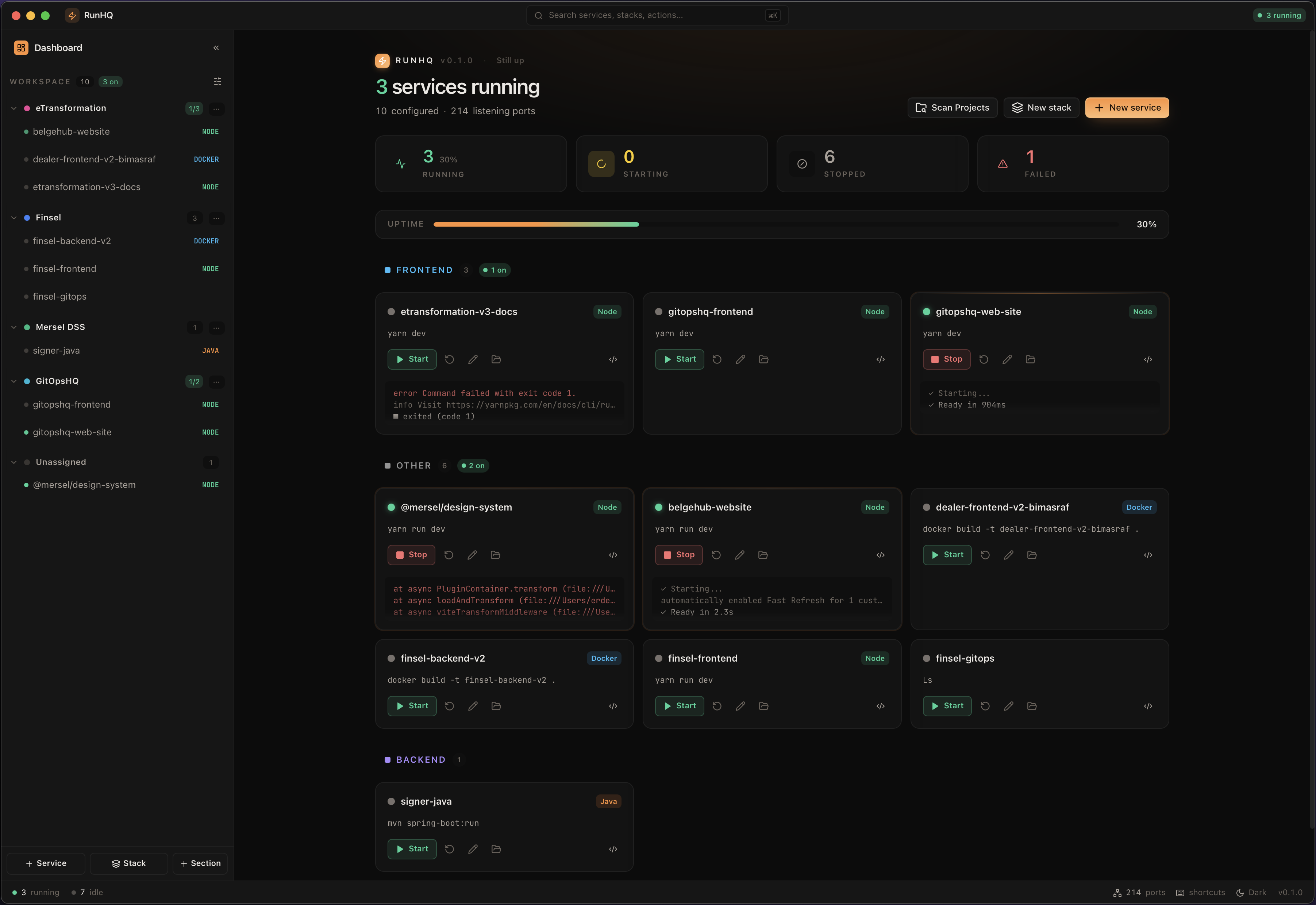
Dozens of projects. Hundreds of services. One native app to start them, open them in your editor, drop into a terminal, and tail their logs — no containers, no cloud, no account.
- 9 runtimes
- <100 MB RAM
- macOS · Linux · Windows
- MIT · open source
Four surfaces. One app.
Run
pnpm dev:3000
go run ./cmd/api:8080
dotnet run—
docker compose up db:5432
Discover
pnpm dev
go run ./cmd/api
uv run train.py
docker compose up
Orchestrate
docker compose up db:5432
redis-server:6379
go run ./cmd/api:8080
pnpm dev:3000
Summon RunHQ from anywhere.
A command palette that follows your fingers. Open it inside the app, or pull it up from any other window — no context switch, no mouse.
Inside RunHQ
Jump between stacks, services and commands without reaching for the sidebar. Fuzzy-search everything you've defined — then start, stop, restart or open logs with one keystroke.
- Fuzzy search
- Start / stop
- Jump to logs
- Toggle theme
Anywhere on your machine
GlobalFrom your editor, browser or terminal — one chord brings the palette to the front even when RunHQ is hidden in the menu bar. Kill a runaway worker without breaking flow.
- System-wide
- Works when hidden
- Re-focuses the app
- No polling
Every shortcut is re-bindable from Settings → Shortcuts — pick whatever your muscle memory already owns.
Every feature, at a glance.
Every badge below is shipping today — no cloud, no account, no telemetry.
Logs
- Ring buffer · 10k/svc
- Virtualized list
- stdout + stderr
- Live filter
- Follow tail
- ANSI color
- Copy line
- Jump to match
Processes
- SIGTERM → SIGKILL
- Configurable grace
- Per-service env
- One-click restart
- Keyboard-first
- Command palette
- Quick actions
- Zero orphans
Discovery
- package.json
- go.mod
- Cargo.toml
- pyproject.toml
- .csproj
- pom.xml
- build.gradle
- Gemfile
- composer.json
- compose.yaml
- Port watchdog
- Zombie kill
- Confirm before run
- Never writes to repo
Projects & stacks
- Unlimited stacks
- Unlimited services
- Recent projects
- Favorites
- Quick switcher
- Drag to reorder
- Global search
- Per-project cwd
Under the hood
- Rust core
- Tauri shell
- Single binary
- <100 MB idle RAM
- No Electron
- No Node runtime
- No telemetry
- MIT license
Platforms
- macOS 12+
- Apple Silicon
- Intel Macs
- Ubuntu 22.04+
- Debian
- Fedora
- Arch
- Windows 10+
- x86_64
Get it running.
Download a release
Prebuilt binaries for macOS, Linux and Windows are published on every tagged release. No toolchain required — download, install, run.
-
macOS
.dmgApple Silicon + Intel -
Linux
.AppImage·.debx86_64 -
Windows
.msi·.exex86_64
main.macOS first launch: if you see "RunHQ is damaged", run
xattr -cr /Applications/RunHQ.app once. RunHQ isn't Apple-notarized yet
(coming soon); Homebrew installs skip this step automatically.
Build from source
Clone the repo, install deps, run in dev mode with hot reload, or bundle your own
signed release with pnpm tauri:build.
git clone github.com/erdembas/runhq
cd runhq && pnpm install
copy
pnpm tauri:dev
copy
pnpm tauri:build.
One-line install for your OS.
brew tap erdembas/tap
brew install --cask runhq
copy
brew upgrade --cask runhqwinget install erdembas.RunHQ
copy
winget upgrade erdembas.RunHQgh release download --repo erdembas/runhq --pattern "*.deb"
sudo dpkg -i
RunHQ_*_amd64.deb
copy
Every project. One window.
Free · MIT · macOS · Linux · Windows
Free forever. No credit card. No account.